FINTRAC Reporting Automation for Canadian MSBs, Payment Businesses and Casinos
Move from transaction data to validated, reviewed and acknowledged FINTRAC reports through one controlled workflow. Apply report-specific aggregation checks, complete required fields, manage approvals and preserve the reporting history from preparation through submission.
FINTRAC reporting becomes difficult before the report is filed
Much of the reporting effort goes into work done before submission: combining transaction data from multiple systems, identifying related transactions, applying report-specific aggregation rules, completing missing client and transaction fields, coordinating approval, tracking deadlines, resolving validation warnings, storing submission evidence and correcting previously filed reports.
.svg)
Fragmented transaction data
Potentially reportable transactions may be spread across payment systems, branches, customer records, wallet infrastructure and third-party processors.
.svg)
Manual aggregation
Individually smaller transactions may become reportable when the relevant FINTRAC 24-hour rule is applied. Finding those relationships by hand is slow and error-prone.
.svg)
Incomplete reporting data
A transaction may cross a threshold while required conductor, beneficiary, third-party or account information is still missing from source systems.
.svg)
Weak approval evidence
Email and spreadsheet-based reporting often makes it difficult to show who prepared, reviewed, approved and corrected a report.
What the platform automates, and what your team controls
The platform automates the reporting workflow; compliance judgement and accountability stay with your team.
Five steps from transaction data to a tracked report
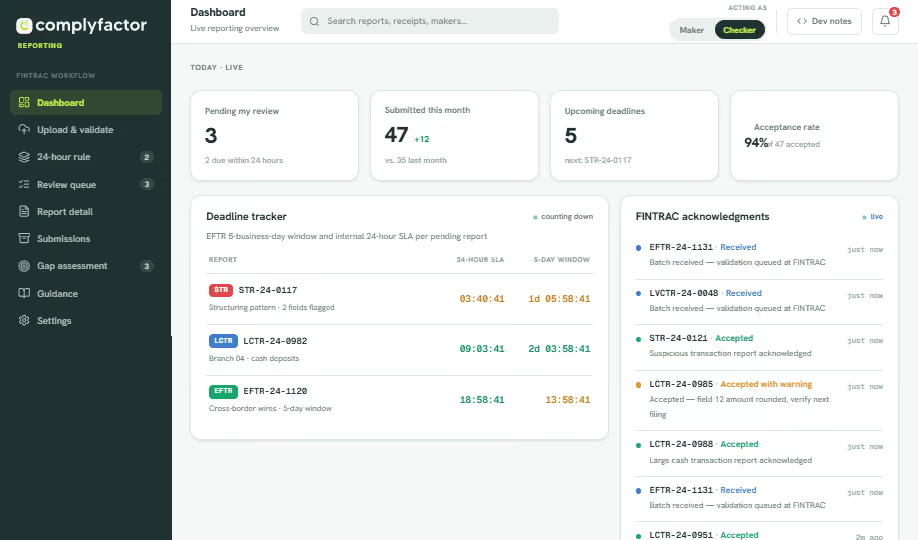
Select a step to see the corresponding screen. Screens shown are illustrative product wireframes.
Upload structured transaction data or connect approved source systems. Reusable mappings align source information with the relevant FINTRAC report fields.
Apply configurable report-type rules, thresholds and aggregation logic to surface transactions that may require review, including report-specific 24-hour aggregation checks.
Check mandatory fields, mandatory-if-applicable information, formatting and conditional data before a report moves toward final approval.
Route reports through configurable maker-checker workflows, with comments, returned-for-correction status and recorded sign-off.
Where FINTRAC API report submission access is in place for your business, submit reports and capture acknowledgements, warnings and rejected-report responses. Where API access is not yet in place, the workflow produces validated, approved report data for submission through your existing FINTRAC channel, with status recorded against the report.
.avif)
.avif)
.avif)
The FINTRAC reports MSBs, payment businesses and casinos file most
Five live report workflows cover the report types that drive most reporting volume for Canadian MSBs and payment businesses with FINTRAC reporting obligations, plus Casino Disbursement Reports for casino reporting entities. Whether a specific report is required in a given situation always depends on your activities and the applicable regulations.
Reasonable grounds to suspect a transaction is related to money laundering, terrorist financing or sanctions evasion. Your team makes that determination, not the software.
Receipt of $10,000 CAD or more in cash, including amounts aggregated under the applicable 24-hour rule.
Receipt of virtual currency equivalent to $10,000 CAD or more, including amounts aggregated under the applicable 24-hour rule.
A casino disburses $10,000 CAD or more in a single transaction, including applicable multiple disbursements aggregated under the FINTRAC 24-hour rule.
Report-specific 24-hour aggregation checks
There is no single generic rolling-window calculation that applies identically to every report type. Whether transactions must be aggregated depends on the applicable FINTRAC rule for that report, and on who is involved. The platform is designed to apply configurable, report-specific aggregation logic and present the result for your team to confirm.
Factors the applicable aggregation check can turn on:
Catch reporting issues before submission
Validation runs before a report reaches approval, distinguishing warnings from submission-blocking errors so your team can prioritize what actually stops a filing. Validation reduces preventable errors; it does not guarantee that FINTRAC will accept a report.
Field-level guidance sits alongside each check, so preparers can resolve issues without leaving the report.
Controlled review before submission
Preparation and approval are separate roles, with configurable reviewers and clear final submission authority, so approval evidence is created as the work happens.
.svg)
Separate preparation and approval
Makers draft, checkers approve. Reviewer assignments are configurable to your team structure, and viewers can see everything without changing anything.
.svg)
Comments and returned-for-correction
Reviewers can raise internal questions on the report itself and return it for correction, keeping the discussion attached to the record instead of scattered across email.
Time-stamped sign-off
Recorded sign-off and time-stamped actions show who exercised final submission authority on each report, and when.
Track acknowledgements, corrections and report history
A submitted report can come back with warnings or be rejected. The workflow is designed to capture the submission acknowledgement and report reference, record warnings, assign corrections to a team member, and handle change submissions and, where supported, deleted or withdrawn reports.
Corrected versions stay linked to the original, so the complete resubmission history reads as one record.
.avif)
Submission flexibility, a retrievable archive, and separate testing
How a report leaves your business, what you can retrieve afterwards, and where you test changes before they touch production.
.svg)
Individual or aggregate submission
File a single report as soon as it is approved, or batch approved reports together and submit them as a group. The choice is yours, report by report.
.svg)
Retrievable anytime
Every submitted report stays accessible in the archive and downloadable as PDF or CSV, whenever you need a copy.
.svg)
JSON payload and confirmation number
The JSON payload sent to FINTRAC is retained against each report, alongside the FINTRAC confirmation number, for verification and dispute handling.
.svg)
Sandbox and production environments
Test mappings, validation rules and integrations in sandbox before anything touches live FINTRAC submissions in production.
Reporting evidence your reviewers can follow
Whether the reader is your independent AML reviewer, your board or an examiner, each step of a reporting record needs to be traceable. The platform is designed to preserve the chain from source data to final outcome for every report.
Sensitive reporting data requires controlled access
FINTRAC reports contain some of the most sensitive client and transaction information a business holds. The platform is built around controlled access as a design principle: role-based permissions, separation between preparation and approval, and activity logs that record who did what.
The security architecture applicable to your engagement, including authentication options, encryption details, hosting locations, data-retention controls and any certifications, is confirmed in writing during scoping. Ask for the current written security summary during a demo conversation.
Security areas confirmed per engagement
Status of each control is confirmed in writing per engagement. No certification claims are made on this page.
Implementation built around your reporting data
There is no universal implementation timeline. Timing depends on your data quality, the report types in scope, transaction volumes, required integrations, FINTRAC API readiness, internal testing and your security requirements. We set the plan accordingly.
Software supported by Canadian AML specialists
ComplyFactor Reporting is built by an AML advisory firm that works with Canadian MSBs, PSPs and fintechs. Our team supports report-field mapping, reporting-process design, threshold and aggregation-rule configuration, data-quality review, maker-checker workflow setup and FINTRAC API implementation.
Beyond setup, the same specialists can assist with reporting backlog remediation, quality assurance and regulatory update monitoring. Where you need it, they can also provide fractional compliance officer support or an independent AML effectiveness review delivered separately from the platform.
Advisory involvement strengthens the process; it does not eliminate reporting errors or replace your own compliance responsibilities.
.avif)
Canadian MSBs and payment businesses with FINTRAC reporting obligations
The workflow is designed for the businesses that carry real FINTRAC reporting volume, including foreign MSBs serving Canadian clients and casino reporting entities filing CDRs. Whether a given payment business has MSB or other FINTRAC obligations depends on its actual service model, which we confirm during scoping.
Remittance and money-transfer businesses
Handle incoming and outgoing international transfers, client data, beneficiaries and reportable EFT workflows.
Foreign-exchange MSBs
Manage cash, currency conversion, customer and third-party information across multiple locations.
Crypto and virtual-currency businesses
Review virtual-currency receipts, wallet data, exchange-rate evidence and LVCTR requirements.
Payment businesses with FINTRAC obligations
Support reporting where the actual service model creates MSB or other FINTRAC obligations. Not every payment service provider has the same reporting duties.
Multi-location and agent-based MSBs
Aggregate potentially related activity across branches, agents and transaction channels.
Casino reporting entities
Identify reportable disbursements, apply the applicable 24-hour aggregation checks and manage CDR preparation, approval and acknowledgement tracking.
Not sure where you fit?
Start with our plain-language guide to AML compliance in Canada, or raise it on the scoping call. Obligations are confirmed before any workflow is configured.
What a controlled reporting workflow gives your team
These outcomes are qualitative.
Fewer preventable reporting errors
Validate required information before the report reaches submission.
Earlier visibility into reportable activity
Surface potential threshold events before filing deadlines become urgent.
Clearer accountability
See who prepared, reviewed, approved, submitted and corrected each report.
Faster report retrieval
Locate transaction details, approvals and acknowledgements without rebuilding the history from email and spreadsheets.
Straightforward monthly pricing for FINTRAC reporting
Every plan includes report-specific validation against FINTRAC formatting standards, individual or aggregate submission, a downloadable report archive and a full audit trail. Upgrade for maker-checker governance, higher volumes and system integration.
Core
For a single team filing steadily.
.svg)
Growth
For teams that need controlled review.
Enterprise
For high-volume and multi-entity filers.
.svg)
One-time setup: $800 USD
Charged once per engagement, on every plan. A ComplyFactor compliance officer configures your reporting structure (report types, thresholds, aggregation rules and field mappings) to match your actual business model and transaction flows before you go live.
See your FINTRAC reporting workflow in one platform
Walk through how transaction data can be mapped, validated, reviewed and prepared for submission using your actual report types and operating model.


FINTRAC reporting software, answered plainly
FINTRAC reporting software helps Canadian reporting entities prepare, validate, review, submit and track the transaction reports required under the PCMLTFA, such as STRs, LCTRs, EFTRs and LVCTRs. ComplyFactor Reporting is a workflow platform of this kind that structures the process from transaction data through validation, approval and submission tracking while keeping reporting decisions with your compliance team.
Five report workflows are live: Suspicious Transaction Reports (STR), Large Cash Transaction Reports (LCTR), Electronic Funds Transfer Reports (EFTR), Large Virtual Currency Transaction Reports (LVCTR) and, for casino reporting entities, Casino Disbursement Reports (CDR). The report types configured for your business are confirmed as part of scoping.
Submission through FINTRAC API report submission depends on FINTRAC API enrolment for each reporting entity. Where API access is not yet in place for your business, the platform produces validated, approved report data for submission through your existing FINTRAC channel, with submission status and acknowledgements recorded against the report record. The submission channel used for your business is confirmed during scoping.
No. The platform can surface activity for review and structure the STR preparation and approval workflow, but establishing reasonable grounds to suspect, writing the narrative and deciding to file remain decisions made by your compliance team. The reporting entity's legal responsibility is not transferred to the software.
Aggregation checks are report-specific. The applicable FINTRAC 24-hour rule depends on the report type, transaction timing, who conducted the transactions, third-party involvement, beneficiaries and requester relationships. The platform is designed to apply configurable, report-specific aggregation logic to surface potentially related transactions for your team to confirm. It is not a single generic rolling-window calculation applied identically to every report type.
Yes. Configurable maker-checker workflows separate preparation from approval. Reviewers can comment, return reports for correction and record sign-off, and each action is time-stamped in the report's activity log before final submission authority is exercised.
The workflow is designed to capture acknowledgements, warnings and rejected-report responses, assign corrections to a team member, and link corrected versions to the original report so the full resubmission history stays in one record.
Structured transaction files such as CSV exports are the primary import route. Reusable mappings align your source fields with the relevant FINTRAC report fields, so recurring imports do not need to be re-mapped each time. Support for specific source formats is confirmed during implementation scoping.
No. Reporting entities remain responsible for determining their obligations, reviewing reports and complying with the PCMLTFA and applicable regulations. The platform supports preparation, validation, workflow and tracking; it does not replace your compliance officer's judgement or your legal accountability.
There is no universal timeline. Implementation timing depends on data quality, the report types in scope, transaction volumes, required integrations, FINTRAC API readiness, internal testing and your security requirements. A realistic plan is set during the initial scoping conversation.
Hosting locations and the security architecture applicable to your engagement are confirmed in writing during scoping. If data residency is a requirement for your business, raise it during the demo conversation and we will confirm the current position in writing.
The workflow is designed around batch import of structured transaction data, and supports FINTRAC API report submission (the channel FINTRAC provides for higher reporting volumes), subject to FINTRAC API enrolment for your business. Supported volumes are confirmed case by case against your actual reporting profile.